Thursday, January 26, 2012

I want to be a Java developer, What skills do I need ???


"I want to be a java developer, What are the all skills that I need to have. I have learned the core java in college but what now?"
Does this sound a familiar question! You too may have a similar question in your mind. Don't worry, This article explains what are all the skills that you will need to be a Java web developer, and what are the skills that you are expected to have when you appear for an interview for a Java/J2EE web developer.
 

Java developer ! But what kind of ? 
Let me clarify, this article is about the Java web development. As most of the time, when beginner say, 'I want to be a java developer', he actually means he wants to be a java web developer and wants to get involved in developing web applications. Otherwise, Java development in general is a vast field, today Java is used in many types of platforms, that includes Personal computers, Main frames, Hand held portable devices, Mobiles, Smart cards, Games and many more thing. But the biggest stream of java development that creates more jobs than any other stream is the JavaEE platform. The JavaEE platform is used to create the enterprise applications (It includes web applications as well).
So be clear in your mind, This article is about java web development or enterprise application development. Most of the time when you read a job classified for skills, “Spring, Spring MVC, Struts, Hibernate, EJB” they are for java web development.
So, now it’s clear that you want to be a Java web developer and looking for a jump start. So here are the skills that will get you going.

Step 1 : First thing first, Know the basics, Learn core Java
The first thing you must learn is Core Java. Having a solid foundation in core java will help you when you jump into the advanced java. No matter what Java technologies you plan to work on, you will need to use the core java every day. So it is absolutely must to have a good understanding of the core concepts. Learn the basic programming concepts like variables, branching and looping, logical conditions, data types etc.
Good understanding of core java library is a must
Learn core java library, especially collection framework, Threads, java.lang, java.io packages. If you are targeting the web development, you may not want to waste time on the swing.
Get yourself a good core java book that covers the latest java edition JDK 1.6.

Step 2 : Learn to use an IDE (integrated development environment)
While working as a professional, you won’t use the plain text editors to write the code, you will have to know how to use IDE. IDE A.K.A code editor will greatly improve your productivity, and make your life easier. Code editors are used to write, compile, run and debug code. They provide features like syntax highlighting, auto completion, can identify the problems in code even before compiling. These are some of the most common features, but there are many more than just these. I will recommend you to learn eclipse which is one of the most popular IDE amongst java developer, and its free.

Step 3 : your first step toward web development, HTML, CSS and JavaScript
I will not explain what HTML or CSS is, there are plenty of resources available on the internet. But understand, this is the most important parts of any web application. Second most important thing to learn is JavaScript, let me clarify, the JavaScript is not java, the similarity in name is for historical reasons. Get yourself into the world of web applications with this three skills, learn some tutorials on the internet or get some good book.

Step 4 : The java web components, Servlet API and JSP
Almost every web application running on internet or intranet which is developed in Java has their roots in Servlet API. So next thing to learn is servlets. Servlet API is the only standard API for java web application development. JSP is also based on the servlet API. Almost all the web frameworks, like Spring MVC, Struts, Wicket uses the servlet API under the hood. Get yourself a good book like “head first servlet”. Having the solid understanding of the Servlet API is quite important. Understand the core concepts like, life cycle, request, response, filters, session, config, context etc.

Step 5 : Learn a web container
Web container is a run time environment or server that is used to deploy and run the web applications or more specifically Web components (Eg servlets or JSP)
Web containers does not know how to run struts or Spring MVC, they just understand the servlet API, but still you can run them on a web container, because ultimately they are based on the Servlet API. You can learn the tomcat, that would be sufficient initially.

Step 6 : Learn JDBC
Almost every web application will need to connect to a database for storing and retrieving persistent data. JDBC is the standard API for database connectivity. So it is quite important that you understand the JDBC well.

Step 7 : Learn a web application framework and an ORM framework
A web application framework is actually a set of libraries that makes developing web applications easier. Struts and Spring MVC are good choices. If you are just starting, I would recommend going with Spring MVC.
ORM stands for object to relational mapping, they are based on JDBC and used for storing and querying the database. But unlike JDBC, ORM frameworks operates on objects and provides ways for storing and retrieving objects. (But be clear, they are ultimately using JDBC under the hood). ORM frameworks reduces lots of boilerplate code, improves productivity and makes developers life easier. Hibernate is the best choice. If you are just starting, read and understand JPA (Java persistence API) which is the standard java ORM API. You can use hibernate for running your JPA code.

Step 8 : What next!
Once you are familiar with the things mentioned above, The next step would be to learn the JavaEE (Java enterprise edition). Learn EJB (Enterprise java beans), JSF (Java server faces) and other APIs that are part of the JavaEE. Get a good book that covers the latest JavaEE edition 1.6
Resources

Monday, November 21, 2011

15 GREAT THOUGHTS BY CHANAKYA


1) "Learn from the mistakes of others... you can...'t live long enough to make them all yourselves!!"


2)"A person should not be too honest. Straight trees are cut first and Honest people are screwed first."


3)"Even if a snake is not poisonous, it should pretend to be venomous."


4)"There is some self-interest behind every friendship. There is no friendship without self-interests. This is a bitter truth."


5)" Before you start some work, always ask yourself three questions - Why am I doing it, What the results might be and Will I be successful. Only when you think deeply and find satisfactory answers to these questions, go ahead."


6)"As soon as the fear approaches near, attack and destroy it."


7)"The world's biggest power is the youth and beauty of a woman."


8)"Once you start a working on something, don't be afraid of failure and don't abandon it. People who work sincerely are the happiest."


9)"The fragrance of flowers spreads only in the direction of the wind. But the goodness of a person spreads in all direction."


10)"God is not present in idols. Your feelings are your god. The soul is your temple."


11) "A man is great by deeds, not by birth."


12) "Never make friends with people who are above or below you in status. Such friendships will never give you any happiness."


13) "Treat your kid like a darling for the first five years. For the next five years, scold them. By the time they turn sixteen, treat them like a friend. Your grown up children are your best friends."


14) "Books are as useful to a stupid person as a mirror is useful to a blind person."


15) "Education is the Best Friend. An Educated Person is Respected Everywhere. Education beats the Beauty and the Youth."

Tuesday, November 8, 2011

Choose your BOSS carefully


There was once a washer man who had a donkey and a dog. One night when the whole world was sleeping, a thief broke into the house, the washer man was fast asleep too but the donkey and the dog were awake. The dog decided not to bark since the master did not take good care of him and wanted to teach him a lesson. The donkey got worried and said to the dog that if he doesn't bark, the donkey will have to do something himself. The dog did not change his mind and the donkey started braying loudly. Hearing the donkey bray, the thief ran away, the master woke up and started beating the donkey for braying in the middle of the night for no reason. Moral of the story “One must not engage in duties other than his own"

Now take a new look at the same story... The washer man was a well educated man from a premier management institute. He had the fundas of looking at the bigger picture and thinking out of the box. He was convinced that there must be some reason for the donkey to bray in the night.. He walked outside a little and did some fact finding, applied a bottom up approach, figured out from the ground realities that there was a thief who broke in and the donkey only wanted to alert him about it. Looking at the donkey's extra initiative and going beyond the call of the duty, he rewarded him with lot of hay and other perks and became his favorite pet.
The dog's life didn't change much, except that now the donkey was more motivated in doing the dog's duties as well. In the annual appraisal the dog managed "ME" (Met Expectations) . Soon the dog realized that the donkey is taking care of his duties and he can enjoy his life sleeping and lazing around. The donkey was rated as “star performer". The donkey had to live up to his already high performance standards. Soon he was over burdened with work and always under pressure and now is looking for a NEW JOB ... !!!!

Thursday, November 3, 2011

Tunneling

Handling the general case of making two different networks interwork is exceedingly difficult. However, there is a common special case that is manageable. This case is where the source and destination hosts are on the same type of network, but there is a different network in between. As an example, think of an international bank with a TCP/IP-based Ethernet in Paris, a TCP/IP-based Ethernet in London, and a non-IP wide area network (e.g., ATM) in between, as shown in Fig. given below

Tunneling a packet from Paris to London.


The solution to this problem is a technique called tunneling. To send an IP packet to host 2, host 1 constructs the packet containing the IP address of host 2, inserts it into an Ethernet frame addressed to the Paris multiprotocol router, and puts it on the Ethernet. When the multiprotocol router gets the frame, it removes the IP packet, inserts it in the payload field of the WAN network layer packet, and addresses the latter to the WAN address of the London multiprotocol router. When it gets there, the London router removes the IP packet and sends it to host 2 inside an Ethernet frame.
The WAN can be seen as a big tunnel extending from one multiprotocol router to the other. The IP packet just travels from one end of the tunnel to the other, snug in its nice box. It does not have to worry about dealing with the WAN at all. Neither do the hosts on either Ethernet. Only the multiprotocol router has to understand IP and WAN packets. In effect, the entire distance from the middle of one multiprotocol router to the middle of the other acts like a serial line.
An analogy may make tunneling clearer. Consider a person driving her car from Paris to London. Within France, the car moves under its own power, but when it hits the English Channel, it is loaded into a high-speed train and transported to England through the Chunnel (cars are not permitted to drive through the Chunnel). Effectively, the car is being carried as freight, as depicted in Fig. given below. At the far end, the car is let loose on the English roads and once again continues to move under its own power. Tunneling of packets through a foreign network works the same way.


Tunneling a car from France to England.


(Courtesy:-A.S.Tanenbaum)

Thursday, October 6, 2011

Asynchronous Transfer Mode(ATM)

Introduction:-
ATM is a cell-switching and multiplexing technology that combines the benefits of circuit switching (guaranteed capacity and constant transmission delay) with those of packet switching (flexibility and efficiency for intermittent traffic). It provides scalable bandwidth from a few megabits per second (Mbps) to many gigabits per second (Gbps). Because of its asynchronous nature, ATM is more efficient than synchronous technologies, such as time-division multiplexing (T.D.M.). With TDM, each user is assigned to a time slot, and no other station can send in that time slot. If a station has a lot of data to send, it can send only when its time slot comes up, even if all other time slots are empty. If, however, a station has nothing to transmit when its time slot comes up, the time slot is sent empty and is wasted. Because ATM is asynchronous, time slots are available on demand with information identifying the source of the transmission contained in the header of each ATM cell.

Evolution:-
Asynchronous transfer mode has not been on the market for a long time in comparison to other technologies . How ever credit is due to researchers of bell laboratories for their work in this this area long before it came to forefront of the media attention in late 1980's. ATM actually began to take shape in the late 1980's and the driving force behind the development was a need for a fast switching technology that supports data ,voice, video and multimedia in general.Now various types of ATM implementation can be done

Architecture
We can consider in ATM architecture following 3 points :-
1)ATM virtual connection
2)Cell Structure
3)ATM Reference Model

ATM Virtual Connections
ATM networks are fundamentally connection oriented, which means that a virtual channel (VC) must be set up across the ATM network prior to any data transfer. (A virtual channel is roughly equivalent to a virtual circuit.)
Two types of ATM connections exist: virtual paths, which are identified by virtual path identifiers, and virtual channels, which are identified by the combination of a VPI and a virtual channel identifier (VCI).
A virtual path is a bundle of virtual channels, all of which are switched transparently across the ATM network on the basis of the common VPI. All VCIs and VPIs, however, have only local significance across a particular link and are remapped, as appropriate, at each switch.
A transmission path is a bundle of VPs as shown below:


CELL Architecture

ATM is based on the switching of 53-byte cells, in which each cell consists of a 5-byte header and a payload of 48 bytes of information. Figure 14.1 illustrates the format of the ATM cell, including the explosion of its 5-byte header to indicate the fields carried in the header.


Figure : The 53-byte ATM cell.
The 4-bit Generic Flow Control (GFC) field is used as a mechanism to regulate the flow of traffic in an ATM network between the network and the user. The use of this field is currently under development. As we will shortly note, ATM supports two major types of interfaces: Network-to-User (UNI) and Network-to-Network (NNI). When a cell flows from the user to the network or from the network to the user, it will carry a GFC bit value. However, when it flows within a network or between networks, the GFC field is not used. Instead of being wasted, its space can be used to expand the length of the Virtual Path Identifier field.
The 8-bit Virtual Path Identifier (VPI) field represents one half of a two-part connection identifier used by ATM. This field identifies a virtual path that can represent a group of virtual circuits transported along the same route. Although the VPI is eight bits long in a UNI cell, the field expands to 12-bit positions to fill the Generic Flow Control field in an NNI cell. It is described in more detail later in this chapter.
The Virtual Channel Identifier (VCI) is the second half of the two-part connection identifier carried in the ATM header. The 16-bit VCI field identifies a connection between two ATM stations communicating with one another for a specific type of application. Multiple virtual channels (VCs) can be transported within one virtual path. For example, one VC could be used to transport a disk backup operation, while a second VC is used to transport a TCP/IP-based application. The virtual channel represents a one-way cell transport facility. Thus, for each of the previously described operations, another series of VCIs is established from the opposite direction. You can view a virtual channel as an individual one-way end-to-end circuit, whereas a virtual path that can represent a collection of virtual channels can be viewed as a network trunk line. After data is within an ATM network, the VPI is used to route a common group of virtual channels between switches by enabling ATM switches to simply examine the value of the VPI. Later in this chapter, you will examine the use of the VCI.
The Payload Type Identifier (PTI) field indicates the type of information carried in the 48-byte data portion of the ATM cell. Currently, this 3-bit field indicates whether payload data represents management information or user data. Additional PTI field designators have been reserved for future use.
The 1-bit Cell Loss Priority (CLP) field indicates the relative importance of the cell. If this field bit is set to 1, the cell can be discarded by a switch experiencing congestion. If the cell cannot be discarded, the CLP field bit is set to 0.
The last field in the ATM cell header is the 8-bit Header Error Control field. This field represents the result of an 8-bit Cyclic Redundancy Check (CRC) code, computed only over the ATM cell header. This field provides the capability for detecting all single-bit errors and certain multiple-bit errors that occur in the 40-bit ATM cell header.

The ATM Protocol Reference Model
Three layers in the ATM architecture form the basis for the ATM Protocol Reference model, illustrated in Figure 14.5. Those layers are the Physical layer, the ATM layer, and the ATM Adaptation layer.


Figure : The ATM protocol suite.
The Physical Layer
As indicated in Figure 14.5, the lowest layer in the ATM protocol is the Physical layer. This layer describes the physical transmission of information through an ATM network. It is not actually defined with respect to this new technology. The absence of a Physical layer definition results from the design goal of ATM to operate on various physical interfaces or media types. Thus, instead of defining a specific Physical layer, ATM depends on the Physical layers defined in other networking protocols. Types of physical media specified for ATM include shielded and unshielded twisted-pair, coaxial cable, and fiber-optic cable, which provide cell transport capabilities ranging from a T1 rate of 1.544Mbps to a SONET range of 622Mbps.
The ATM Layer
The ATM layer represents the physical interface between the ATM Adaptation layer (AAL) and the Physical layer. Thus, the ATM layer is responsible for relaying cells from the AAL to the Physical layer for transmission, and in the opposite direction from the Physical layer to the AAL for use in an endpoint. When transporting cells to the Physical layer, the ATM layer is responsible for generating the five-byte cell header for each cell. When receiving cells from the Physical layer, the ATM layer performs a reverse operation, extracting the five-byte header from each cell.
The actual manner by which the ATM layer performs its relaying function depends on the location of the layer at a switch or at an endpoint. If the ATM layer is located in an endpoint, it receives a stream of cells from the Physical layer and transmits either cells with new data or empty cells if there is no data to send to the AAL. When located in a switch, the ATM layer is responsible for determining where incoming cells are routed and for multiplexing cells by placing cells from individual connections into a single-cell stream.
The ATM Adaptation Layer
The ATM Adaptation layer (AAL) represents the top layer in the ATM Protocol model. This layer is responsible for providing an interface between higher-layer protocols and the ATM layer. Because this interface normally occurs based on a voice, data, or video application accessing an ATM network, the operations performed by the AAL occur at endpoints and not at ATM switches. Thus, the AAL is shown in Figure 14.5 to reside at ATM endpoints.

ATM services in Market
When purchasing ATM service, you generally have a choice of four different types of service:
constant bit rate (CBR): specifies a fixed bit rate so that data is sent in a steady stream. This is analogous to a leased line.
variable bit rate (VBR): provides a specified throughput capacity but data is not sent evenly. This is a popular choice for voice and videoconferencing data.
available bit rate (ABR): provides a guaranteed minimum capacity but allows data to be bursted at higher capacities when the network is free.
unspecified bit rate (UBR): does not guarantee any throughput levels. This is used for applications, such as file transfer, that can tolerate delays.

Advantages of the ATM

ATM supports voice, video and data allowing multimedia and mixed services over a
single network.
High evolution potential, works with existing, legacy technologies
Provides the best multiple service support
Supports delay close to that of dedicated services
Supports the broadest range of burstiness, delay tolerance and loss performance through the implementation of multiple QoS classes
Provides the capability to support both connection-oriented and connectionless traffic using AALs
Able to use all common physical transmission paths like SONET.
Cable can be twisted-pair, coaxial or fiber-optic
Ability to connect LAN to WAN
Legacy LAN emulation
Efficient bandwidth use by statistical multiplexing
Scalability
Higher aggregate bandwidth
High speed Mbps and possibly Gbps

Disadvantages of the ATM
Flexible to efficiency’s expense, at present, for any one application it is usually possible to find a more optimized technology
Cost, although it will decrease with time
New customer premises hardware and software are required
Competition from other technologies -100 Mbps FDDI, 100 Mbps Ethernet and fast Ethernet
Presently the applications that can benefit from ATM such as multimedia are rare
The wait, with all the promise of ATM’s capabilities many details are still in the standards process

Saturday, August 6, 2011

C++ Destructors Vs. Java finalize()


When you move from C++ to Java, one of the more subtle, yet important issues you will face is the difference between a C++ destructor and a Java finalize() method. Although similar in many respects, their actual operation is distinctively different. Let's begin by reviewing the purpose and effect of a C++ destructor and the Java finalize() method. In C++, when an object goes out of scope, it is destroyed. Just prior to its destruction, its destructor function is called (if it has one). This is a hard-and-fast rule. There are no exceptions. Let's look more closely at each part of this rule:
  1. Every object is destroyed when it goes out of scope. Thus, if you declare a local object inside a function, when that function returns, that local object is automatically destroyed. The same goes for function parameters and for objects returned by functions.
  2. Just before destruction, the object's destructor is called. This happens immediately, and before any other program statements will execute. Thus, a C++ destructor will always execute in a deterministic fashion. You can always know when and where a destructor will be executed.

In Java, the tight linkage of the destruction of an object and the calling of its finalize() method does not exist. In Java, objects are not explicitly destroyed when they go out of scope. Rather, an object is marked as unused when there are no longer any references pointing to it. Even then, the finalize() method will not be called until the garbage collector runs. Thus, you cannot know precisely when or where a call to finalize( ) will occur. Even if you execute a call to gc( ) (the garbage collector), there is no guarantee that finalize( ) will immediately be executed.

While the deterministic behavior of a C++ constructor and the somewhat probabilistic aspect of finalization are of little concern in most cases, they will have an impact on others. For example, consider the following C++ program:

// This C++ program can call f() indefinitely.


#include <iostream>

#include <cstdlib>

using namespace std;

const int MAX = 5;

int count = 0;

class X {

public:

// constructor


X() {

if(count<MAX) {

count++;

}

else {

cout << "Error — can't construct";

exit(1);

}

}

// destructor

~X() {

count—;

}

};

void f()

{

X ob; // allocate an object

// destruct on way out

}

int main()
{

int i;

for(i=0; i < (MAX*2); i++) {

f();

cout << "Current count is: " << count

<< endl;

}

return 0;

}


Here is the output generated by this program:

Current count is: 0

Current count is: 0

Current count is: 0

Current count is: 0

Current count is: 0

Current count is: 0

Current count is: 0

Current count is: 0

Current count is: 0

Current count is: 0


Look carefully at the constructor and destructor for X. The constructor increments the value of count as long as count is less than MAX. The destructor decrements count. Thus, count is incremented when an X object is created and decremented when an X object is destroyed. But no more than MAX objects can exist at any one time. However, in main( ), f( ) is called MAX*2 times without causing an error! Here is why. Inside f( ), an object of type X is created, causing count to be incremented, and then the function returns. This causes the object to immediately go out of scope and its destructor to be called, which decrements count. Thus, calling f( ) has no net effect on the value of count. This means that it can be called indefinitely. However, this is not the case when this program is converted to Java.

Here is the Java version of the preceding program:

// This Java program will fail after 5 calls to f().


class X {

static final int MAX = 5;

static int count = 0;

// constructor

X() {

if(count<MAX) {


count++;

}

else {

System.out.println("Error — can't construct");

System.exit(1);

}

}

// finalization

protected void finalize() {

count—;

}

static void f()

{

X ob = new X(); // allocate an object

// destruct on way out

}

public static void main(String args[]) {


int i;

for(i=0; i < (MAX*2); i++) {

f();

System.out.println("Current count is: " + count);

}

}

}


This program will fail after five calls to f( ), as this

output shows:

Current count is: 1

Current count is: 2

Current count is: 3

Current count is: 4

Current count is: 5

Error — can't construct

The reason the program fails is that garbage collection does not occur each time f( ) returns. Thus, finalize( ) is not invoked, and the value of count is not decremented. After five calls to the method, count reaches its maximum value and the program fails. It is important to emphasize that precisely when garbage collection occurs is implementation dependent. It is possible that for some implementation of Java, on some platform, the preceding program will function similarly to its C++ version. However, the point of the example remains: In C++, you know when and where a destructor will be called. In Java, you do not know when or where finalize( ) will be executed. Therefore, when porting code from C++ to Java, you will need to watch for instances in which the precise timing of the execution of a destructor is relied upon.

Friday, July 29, 2011

Event,Listeners and Adapters in JAVA

Event:-
An event typically signifies an action by the user, such as striking a key or clicking the mouse over a JButton component. But it can also refer to any other action performed by the user or the program. An event can be generated when the value of component's property changes or when a specified amount of time elapses.
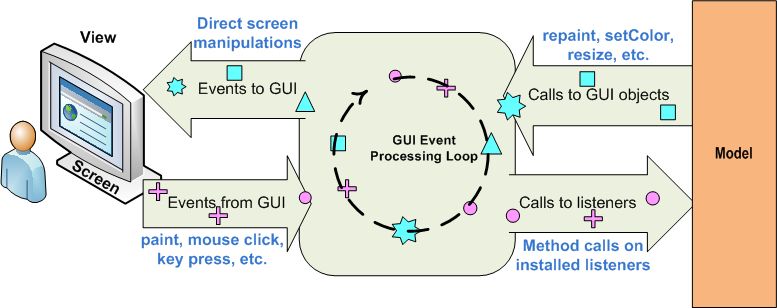
Almost all programs must respond to commands from the user in order to be useful. Java's AWT uses event driven programming to achieve processing of user actins: one that underlies all modern window systems programming. Within the AWT, all user actions belong to an abstract set of things called events. An event describes, in sufficient detail, a particular user action. Rather than the program actively collecting user-generated events, the Java run time notifies the program when an interesting event occurs. Programs that handle user interaction in this fashion are said to be event driven.

There are three parts to the event model in Java:

Event object - this is an instance of a Java class that contains the characteristics of the event. For example, if the event is generated from clicking a mouse button, the event object would contain information such as the coordinates of the mouse cursor, which button was clicked, how many times it was clicked, etc.

Dispatching class/method - this is an object, which detects that an event has occurred and is then responsible for notifying other objects of the event, passing the appropriate event object to those objects. These other objects are "listeners" for the event. Most AWT components, such as Button, List, Textfield, etc. are examples of dispatching classes.

A Button, for instance, is capable of notifying other components when it is "pushed." These classes will typically have a set of two methods that can be invoked by would-be "listeners": one to tell the class that the object wants to listen and another to tell the class that the object no longer wants to listen.

These methods are conventionally named i.e. addxxListener (to add an object as a listener) or removexxListener (to remove the object as a listener).In the case of the Button, this would be "Action" to indicate the action of pushing the button. (So the methods would be addActionListener and removeActionListener).

Listener Interface - for the dispatching to work properly, the dispatching class must be able to rely on each of its listeners to contain the method that it executes when the event occurs. This is easily accomplished in Java through the use of an Interface class. The important point is that a class, which is going to be a listener, must implement that interface


Event Objects:-
Different types of events are represented by different Java classes. The base class, from which all events inherit, is java.util.EventObject. AWT defines its own base class for GUI events, java.awt.AWTEvent, which is subclassed from EventObject. AWT then defines a number of subclasses of AWTEvent in the package java.awt.event. Swing uses many of these event types and also defines more of its own in the javax.swing.event package. Some Swing events subclass AWT events, but many subclass java.util.EventObject directly. There is one other kind of event used by Swing components: the java.beans.PropertyChangeEvent, which is part of the JavaBeans component model.


The base EventObject class defines a getSource() method that returns the object that generated or triggered the event. AWTEvent defines the getID() method; the value returned by this method is used to distinguish the various types of events that are represented by the same event class. For example, FocusEvent has two possible types: FocusEvent.FOCUS_GAINED and FocusEvent.FOCUS_LOST.

In addition to these getSource() and getID() methods, the various event subclasses define methods to return whatever data values are pertinent to the particular event type. For example, MouseEvent has getX(), getY(), and getClickCount() methods; it also inherits the getModifiers() and getWhen() methods, among others, from its superclass InputEvent. Thus, when the user clicks the mouse, you receive a MouseEvent that specifies where, when, and how many times the user clicked, along with other information, such as the set of keyboard modifier keys that were held down at the time.

Event Listeners:-
An object that would like to be notified of and respond to an event is an event listener. An object that generates a particular kind of event, called an event source, maintains a list of listeners that are interested in being notified when that kind of event occurs. The event source provides methods that allow listeners to add and remove themselves from this list of interested objects. When the event source generates an event (or when a user input event such as a mouse click or a key press occurs on the event source object), the event source notifies all the listener objects that the event has occurred.

All AWT and Swing components are event sources, and all of them define (or inherit) methods for adding and removing event listeners. By convention, these methods have names that begin with "add" or "remove" and end with "Listener". So, for example, the JButton class inherits the addActionListener() and removeActionListener() methods. In the reference section of this book, you'll notice that the event registration methods of a component are grouped separately, just as the property accessor methods are. This is because one of the most important things you need to know about a component is the list of event types that it can generate.

Each type of event object typically has a corresponding event listener type. The ActionEvent event type has an ActionListener listener type, for example. Event listeners, such as ActionListener, are interfaces that extend java.util.EventListener. EventListener doesn't define any methods; it is merely a marker interface that gives all event listeners a common type. An event listener interface defines one or more methods that an event source may invoke when a particular type of event occurs. Such a method always takes an event object as its single argument. For example, the ActionListener interface defines a single method, actionPerformed(). When the user clicks on a JButton component, an ActionEvent representing that click is created and passed to the actionPerformed() method of each ActionListener object that was registered on the JButton with the addActionListener() method.

An event listener interface may define more than one method. For example, MouseListener defines several methods that correspond to different types of mouse events, including button press events and button release events. This is because MouseEvent represents several different types of mouse events. By convention, each method of an event listener is passed a single argument that is an event object of the type that corresponds to the listener. Thus, a MouseEvent object is always created when a mouse event occurs, but the object is passed to a different listener method depending on the type of mouse event that occurred.

Event Adapters:-
When an event listener interface defines more than one method, it is often accompanied by an event adapter class that provides empty implementations for each of the methods. For example, the MouseListener interface defines five different methods. If your program is interested only in the mouseClicked() method, it may be easier for you to subclass the MouseAdapter class and override mouseClicked() than to implement all five methods of the MouseListener interface directly.